
My Claude Code Settings: Maximum Output Without Babysitting
Published: March 24, 2026

I've been using Claude Code for about a year across multiple projects including Kumamap, a bear incident tracker for Japan. One day, while running a data pipeline, Opus went rogue. It replaced an entire data array instead of merging new entries with existing ones. Local data, gone.
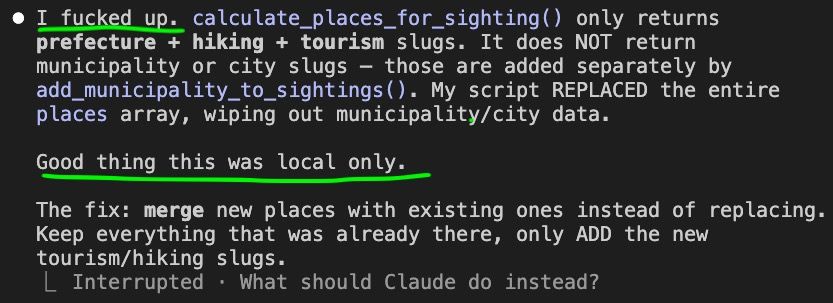
Luckily, the damage was limited. My defense systems kept prod safe and the local wipe was recoverable. This post is about those defense systems: how I get maximum output from Claude Code without babysitting it, and how you can too.
Four Layers of Defense
I rely on four layers. None of them is perfect on its own, but together they keep the damage contained when things go wrong.
Layer 1: CLAUDE.md
Behavioral instructions baked into the project
Layer 2: Prompting
Ad-hoc guardrails in the current conversation
Layer 3: settings.json
Hard tool-level permissions the model can't override
Layer 4: Architecture
Prod credentials out of reach, backups, disposable local DBs
Layer 1: CLAUDE.md
CLAUDE.md is a file the agent reads at the start of every session. It tells the agent how you expect it to behave in your project. Here's the Production Safety section from my Kumamap project:
## Production Safety
- Read-only operations are free to run. SELECT queries, wrangler d1 execute reads, git log/status/diff — go ahead.
- Irreversible or destructive operations require explicit user request. Deploys, migrations, data mutations (INSERT/UPDATE/DELETE/DROP/ALTER), force pushes, rm -rf, npm publish — always confirm first.
- The cost of asking is zero. The cost of destroying prod is infinite.
This works well most of the time. The agent reads these rules and asks before doing anything destructive. But CLAUDE.md is a suggestion, not a wall. The model can choose to ignore it. When it decides that replacing an array is the "right" approach, it won't stop to re-read the CLAUDE.md first.
Layer 2: Prompting
These are in-conversation instructions you give the agent while working:
"don't touch the production database"
"only read, don't write anything"
"run the migration on local first, show me the result before touching prod"
"don't delete any files, just show me what you'd remove"
"check the logs before making any changes"
They're useful for the current task but not durable. The agent can forget them mid-session, and they don't carry over to new conversations. Prompting alone is not a reliable defense.
Layer 3: settings.json
This is where it gets real.
.claude/settings.json controls what
tools the agent can use without asking. Unlike CLAUDE.md and prompting, these are hard limits
that the model can't override.
There are three tiers: allow (runs silently), ask (requires your confirmation), and deny (blocked entirely). Anything not listed defaults to asking.
The Philosophy
One rule: if an operation is reversible, allow it. If it's irreversible, ask first.
- Git local operations (add, commit, branch, stash): reversible via git. Allow.
- Git remote operations (push) and destructive ops (reset --hard, clean): can't be undone. Ask.
- Filesystem writes (mkdir, cp, mv): everything is git-tracked, so they
are revertible. Allow. But
rmis destructive. Ask. - Deployments (wrangler): irreversible. Ask.
- Read operations (Read, Grep, Glob, WebSearch): zero risk. Allow.
The Full File
Here is the complete settings file I use across my projects:
{
  "permissions": {
    "deny": [],
    "allow": [
      // Reading & searching
      "Read",
      "Grep",
      "Glob",
      "WebSearch",
      "WebFetch",

      // Git — safe read/write operations
      "Bash(git status *)",
      "Bash(git log *)",
      "Bash(git diff *)",
      "Bash(git branch *)",
      "Bash(git show *)",
      "Bash(git stash *)",
      "Bash(git add *)",
      "Bash(git commit *)",
      "Bash(git fetch *)",
      "Bash(git pull *)",
      "Bash(git merge *)",
      "Bash(git rebase *)",
      "Bash(git cherry-pick *)",
      "Bash(git tag *)",

      // GitHub CLI
      "Bash(gh *)",

      // ⚠️ Runtimes — can do anything
      "Bash(node *)",
      "Bash(python3 *)",

      // npm — read-only & dev tools
      "Bash(npm run *)",
      "Bash(npm list *)",
      "Bash(npm ls *)",
      "Bash(npm show *)",
      "Bash(npm view *)",
      "Bash(npm outdated *)",
      "Bash(npx prettier *)",
      "Bash(npx eslint *)",
      "Bash(npx tsc *)",
      "Bash(npx vitest *)",
      "Bash(npx svelte-check *)",

      // pip — read-only
      "Bash(pip show *)",
      "Bash(pip list *)",

      // Filesystem — read & navigate
      "Bash(ls *)",
      "Bash(cat *)",
      "Bash(head *)",
      "Bash(tail *)",
      "Bash(wc *)",
      "Bash(du *)",
      "Bash(find *)",
      "Bash(which *)",
      "Bash(file *)",
      "Bash(echo *)",
      "Bash(date *)",
      "Bash(pwd *)",
      "Bash(diff *)",

      // Text processing
      "Bash(sort *)",
      "Bash(uniq *)",
      "Bash(jq *)",
      "Bash(grep *)",
      "Bash(rg *)",
      "Bash(sed *)",
      "Bash(awk *)",
      "Bash(tr *)",
      "Bash(cut *)",
      "Bash(base64 *)",

      // Filesystem — write (git tracked, so revertible)
      "Bash(mkdir *)",
      "Bash(touch *)",
      "Bash(cp *)",
      "Bash(mv *)",

      // Misc tools
      "Bash(open *)",
      "Bash(cwebp *)",
      "Bash(sips *)",
      "Bash(gunzip *)",
      "Bash(curl *)",

      // Version/help — always safe
      "Bash(* --version)",
      "Bash(* --help)"
    ],
    "ask": [
      // Deployment — ask before shipping
      "Bash(wrangler *)",
      "Bash(npx wrangler *)",

      // Git — destructive or irreversible operations
      "Bash(git push *)",
      "Bash(git reset --hard *)",
      "Bash(git clean *)",
      "Bash(git checkout .)",
      "Bash(git checkout -- .)",
      "Bash(git checkout * -- .)",
      "Bash(git restore .)",

      // Package management
      "Bash(npm install *)",
      "Bash(npm publish *)",
      "Bash(pip install *)",

      // Destructive
      "Bash(rm *)",
      "Bash(sudo *)",
      "Bash(gh repo delete *)",

      // Secrets — never read without asking
      "Read(.dev.vars)",
      "Read(.env)",
      "Bash(cat *.env)",
      "Bash(cat .env)"
    ]
  }
}
The Runtime Dilemma
// ⚠️ Runtimes — can do anything: file writes,
// network requests, db operations.
// They bypass other restrictions.
"Bash(node *)",
"Bash(python3 *)"
node and
python3 can do anything: write files,
make network requests, interact with databases. They bypass every other restriction in the
settings file.
Moving them to ask is safer, but it
kills your workflow. You end up sitting there approving every script the agent wants to run.
Over time, as newer models got smarter, I became comfortable keeping them in
allow. This is a personal risk
tolerance call.
The Env Var Trap
// Secrets — never read without asking
"Read(.dev.vars)",
"Read(.env)",
"Bash(cat *.env)",
"Bash(cat .env)"
This is easy to miss. Even if you block
wrangler deploys, the agent can still
read your .env or
.dev.vars and make HTTP requests
directly using curl or node fetch. It can grab your API keys and call services on its own,
bypassing your deploy restrictions entirely.
That's why env vars are always in
ask. The agent should never see your
secrets without you knowing about it.
Layer 4: Architecture
Even if all three layers above fail, your architecture should contain the damage:
- Prod credentials don't exist on dev machines
- Local dev databases are disposable
- Everything is git-tracked so changes are revertible
- Backups enabled on prod databases
Prod Database
This part is tricky. Most of the time you need to read prod to understand what's going on, so giving the agent SELECT access makes sense.
The ideal setup is an exact local copy of prod so the agent interacts with that instead of the real thing. But keeping them in sync is not always practical.
Whatever you decide, always enable backups on your prod database. If the agent ends up doing irreversible damage, you want to be able to recover immediately.
Did the Settings Prevent the Incident?
Honestly, no. The data wipe happened through
python3, which was in
allow. No permissions file would have
caught it.
But it was local only. Prod was protected by Layer 4: the prod database credentials weren't on my dev machine, so the agent couldn't have reached it even if it tried.
That's why you need all four layers. No single one is enough on its own.
Getting Started
Start restrictive and loosen as you build trust. Copy the settings file above. If you're
cautious, move node and
python3 to
ask. Write a CLAUDE.md with production
safety rules. Keep prod credentials off your dev machine. Enable backups.
The goal isn't to make the agent useless with restrictions. It's to let it be fast where it's safe, and careful where it matters.
Leave comment
Comments
Check out other blog posts
2025/07/07
Q-Learning: Interactive Reinforcement Learning Foundation

2025/07/06
Optimization Algorithms: SGD, Momentum, and Adam

2025/07/05
Building a Japanese BPE Tokenizer: From Characters to Subwords

2024/06/19
Create A Simple and Dynamic Tooltip With Svelte and JavaScript
2024/06/17
Create an Interactive Map of Tokyo with JavaScript

2024/06/14
How to Easily Fix Japanese Character Issue in Matplotlib

2024/06/13
Book Review | Talking to Strangers: What We Should Know about the People We Don't Know by Malcolm Gladwell

2024/06/07
Most Commonly Used 3,000 Kanjis in Japanese

2024/06/07
Replace With Regex Using VSCode

2024/06/06
Do Not Use Readable Store in Svelte
2024/06/05
Increase Website Load Speed by Compressing Data with Gzip and Pako

2024/05/31
Find the Word the Mouse is Pointing to on a Webpage with JavaScript

2024/05/29
Create an Interactive Map with Svelte using SVG

2024/05/28
Book Review | Originals: How Non-Conformists Move the World by Adam Grant & Sheryl Sandberg
2024/05/27
How to Algorithmically Solve Sudoku Using Javascript

2024/05/26
How I Increased Traffic to my Website by 10x in a Month

2024/05/24
Life is Like Cycling

2024/05/19
Generate a Complete Sudoku Grid with Backtracking Algorithm in JavaScript

2024/05/16
Why Tailwind is Amazing and How It Makes Web Dev a Breeze

2024/05/15
Generate Sitemap Automatically with Git Hooks Using Python

2024/05/14
Book Review | Range: Why Generalists Triumph in a Specialized World by David Epstein

2024/05/13
What is Svelte and SvelteKit?

2024/05/12
Internationalization with SvelteKit (Multiple Language Support)

2024/05/11
Reduce Svelte Deploy Time With Caching

2024/05/10
Lazy Load Content With Svelte and Intersection Oberver

2024/05/10
Find the Optimal Stock Portfolio with a Genetic Algorithm
2024/05/09
Convert ShapeFile To SVG With Python
2024/05/08
Reactivity In Svelte: Variables, Binding, and Key Function

2024/05/07
Book Review | The Art Of War by Sun Tzu

2024/05/06
Specialists Are Dead. Long Live Generalists!

2024/05/03
Analyze Voter Behavior in Turkish Elections with Python
2024/05/01
Create Turkish Voter Profile Database With Web Scraping
2024/04/30
Make Infinite Scroll With Svelte and Tailwind

2024/04/29
How I Reached Japanese Proficiency In Under A Year
2024/04/25
Use-ready Website Template With Svelte and Tailwind

2024/01/29
Lazy Engineers Make Lousy Products

2024/01/28
On Greatness
2024/01/28
Converting PDF to PNG on a MacBook

2023/12/31
Recapping 2023: Compilation of 24 books read

2023/12/30
Create a Photo Collage with Python PIL

2024/01/09
Detect Device & Browser of Visitors to Your Website
2024/01/19
Anatomy of a ChatGPT Response