
Lazy Load Content With Svelte and Intersection Oberver
Published: May 10, 2024

Imagine you are serving a bunch of content on a website. Let's assume you have a lot of high quality images like below
Scroll to see all images











Above images add up to more than 10MB! Loading this much data would definitely cause frictions in the user interface, especially for the users on low-data environments.
Svelte provides tools like enhanced:img that helps you serve images in formats like webp.
However, if you images are too big, this solution won't give you a complete work-around. This is where lazy loading comes into picture.
Lazy Loading
The idea behind the lazy loading is to wait loading the content until the user scrolls to it.
This way, we can load the content that's only visible in the viewport at first, and hold on loading others. This will drastically reduce the load time.
This idea can be implemented like below in Svelte.
{#each images as image}
 {#if scrolledToImage}
  <img src={image} />
 {/if}
{/each}
We can add fade in transitions, to give it a better user experience. This will make it seem like we are loading images as the user is scrolling, which is actually the case.
<script>
import { fade } from 'svelte/transition';
let images = [img1, img2, img3, ...]
let scrolls = [scrollForImg1, scrollForImg2, scrollForImg3, ...]
</script>

{#each images as image, index}
 {#if scrolls[index]}
  <div transition:fade={{ duration: 300 }}>
   <img src={image} />
  </div>
 {/if}
{/each}
For transitions to work in Svelte, they should enter the DOM and that's where the if statement helps us.
If statement is also the backbone of the lazy loading, as the elements that are not scrolled won't be rendered, so we will save resources.
Now let's see how we can determine whether the user has scrolled to the image in question, ie scrolledToImage. This is where we will use the Intersection Observer API.
Intersection Observer
I won't get into details, as it can be found in the above link, but what Intersection Observer does is, it fires an event when an item intersects another item. E.g. when we useviewport as the base item, intersection means whether the item is scrolled to.
The syntax is like below:
let callback = (entries, observer) => {
 entries.forEach((entry) => {
  if (entry.isIntersecting) {
   // load image
  }
 });
};

let observer = new IntersectionObserver(callback, { threshold: 0 });
// threshold:0 means any part of item is intersecting the viewport. I.e. the view is scrolled to.

observer.observe(element);
Note that IntersectionObserver should be called after the component is mounted in Svelte, because this object does not exist in the server and it will give error.
Bring It All Together
<script>
import { onMount } from 'svelte';
import { fade } from 'svelte/transition';

// Array that will keep the image divs
let divs = images.map(() => null);

// Array that will keep info about whether an image is scrolled to
let scrolls = images.map(() => false);

// Setup intersection observer when component is mounted
onMount(async () => {
 let callback = (entries, observer) => {
  entries.forEach((entry) => {
   if (entry.isIntersecting) {
    // we get the div id, which will point us to the right element in scrolls array
    scrolls[entry.target.id] = true;
   }
  });
 };

 // Set the rooter as the div with id "container" as that is the parent div of the images
 let observer = new IntersectionObserver(callback, { threshold: 0, root: document.querySelector('#container') });

 // Observe each div
 divs.forEach((d) => {observer.observe(d)});
});
</script>

// NOTE1: the parent div of each image needs to have an initial height. (E.g. 300px)
// Otherwise, they will be defaulted to 0 at first,
// and all images will be intersecting with the container.
// This will load all images at once, which will defy our purpose.

// NOTE2: transition:fade should NOT be dded to img element
// Instead, add an enclosing div, and add it to that div
// Otherwise, transitions don't work on image elements.

<div id="container">
 {#each images as image, index}
  <div bind:this={divs[index]} id={index} class="min-h-[300px]">
   {#if scrolls[index]}
    <div transition:fade={{ duration: 500 }}>
     <img src={image} class="h-[300px] object-contain" alt="An object" />
    </div>
   {/if}
  </div>
 {/each}
</div>
Now let's see whether above code will work in the container that we saw above:
Scroll to see all images
It does! And it looks fancy doesn't it. Now with the power of Svelte transition and Intersection Observer, you can create fancy lazy loaders.
Let's check whether the images are indeed lazy loaded:
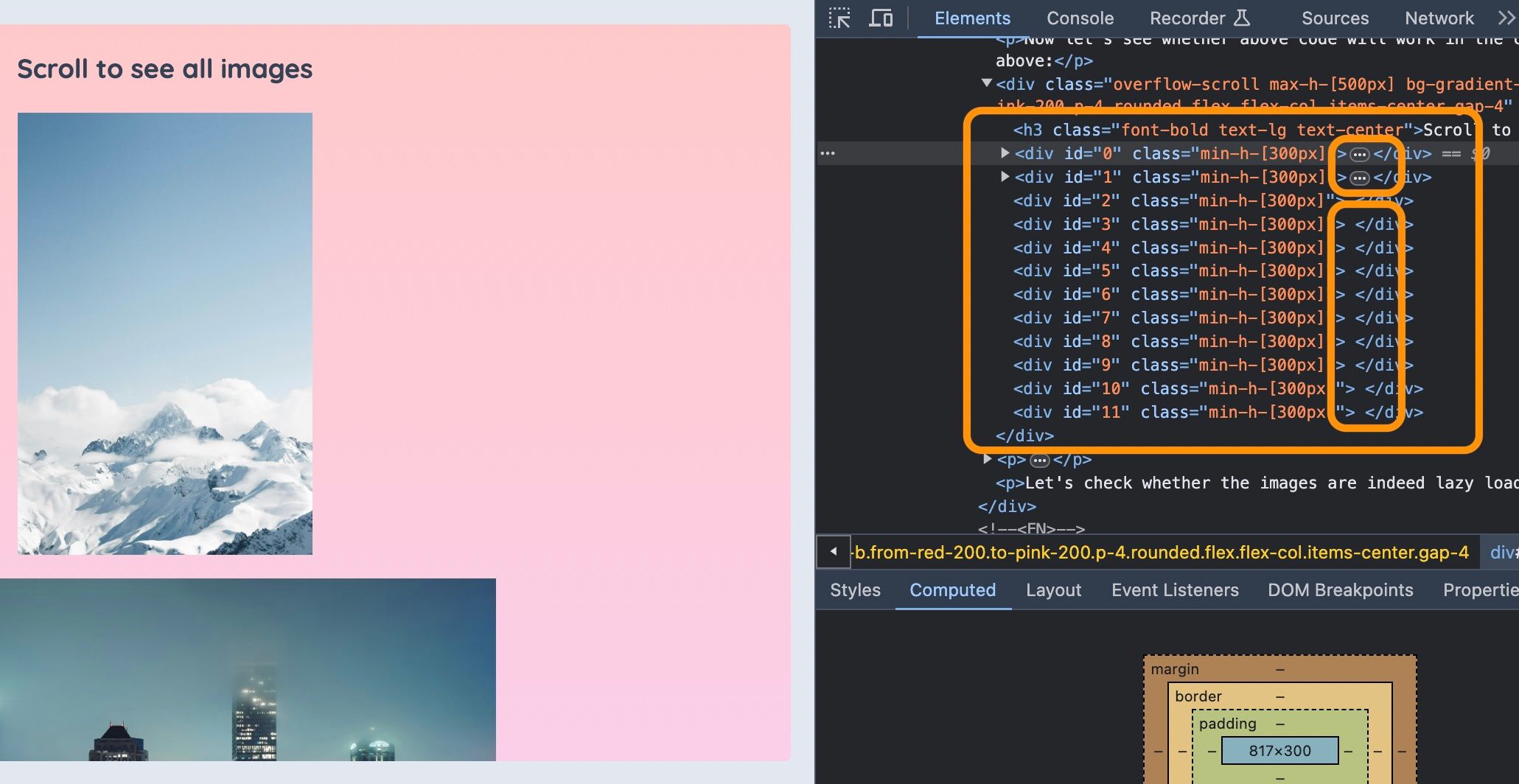
You can see on the Chrome dev tools that, if the container is not scrolled, i.e. in its default scroll position, only 2 divs have images in them. And the remaining divs don't have any image in them.
So we can see that, we only loaded 2 images initially. If the user does not scroll, that will be it. If the user decides to scroll, we will be loading as the user scrolls. This is a user-centric and resource-saving approach to content serving.
Conclusion
Hope you can build a lazy loader with Svelte transitions and Intersection Observer after reading this. Let me know how it goes!
Happy hacking!
Leave comment
Comments
Check out other blog posts

2026/03/24
My Claude Code Settings: Maximum Output Without Babysitting

2025/07/07
Q-Learning: Interactive Reinforcement Learning Foundation

2025/07/06
Optimization Algorithms: SGD, Momentum, and Adam

2025/07/05
Building a Japanese BPE Tokenizer: From Characters to Subwords

2024/06/19
Create A Simple and Dynamic Tooltip With Svelte and JavaScript
2024/06/17
Create an Interactive Map of Tokyo with JavaScript

2024/06/14
How to Easily Fix Japanese Character Issue in Matplotlib

2024/06/13
Book Review | Talking to Strangers: What We Should Know about the People We Don't Know by Malcolm Gladwell

2024/06/07
Most Commonly Used 3,000 Kanjis in Japanese

2024/06/07
Replace With Regex Using VSCode

2024/06/06
Do Not Use Readable Store in Svelte
2024/06/05
Increase Website Load Speed by Compressing Data with Gzip and Pako

2024/05/31
Find the Word the Mouse is Pointing to on a Webpage with JavaScript

2024/05/29
Create an Interactive Map with Svelte using SVG
2024/05/28
Book Review | Originals: How Non-Conformists Move the World by Adam Grant & Sheryl Sandberg
2024/05/27
How to Algorithmically Solve Sudoku Using Javascript

2024/05/26
How I Increased Traffic to my Website by 10x in a Month

2024/05/24
Life is Like Cycling
2024/05/19
Generate a Complete Sudoku Grid with Backtracking Algorithm in JavaScript

2024/05/16
Why Tailwind is Amazing and How It Makes Web Dev a Breeze

2024/05/15
Generate Sitemap Automatically with Git Hooks Using Python

2024/05/14
Book Review | Range: Why Generalists Triumph in a Specialized World by David Epstein

2024/05/13
What is Svelte and SvelteKit?

2024/05/12
Internationalization with SvelteKit (Multiple Language Support)

2024/05/11
Reduce Svelte Deploy Time With Caching

2024/05/10
Find the Optimal Stock Portfolio with a Genetic Algorithm
2024/05/09
Convert ShapeFile To SVG With Python
2024/05/08
Reactivity In Svelte: Variables, Binding, and Key Function
2024/05/07
Book Review | The Art Of War by Sun Tzu

2024/05/06
Specialists Are Dead. Long Live Generalists!

2024/05/03
Analyze Voter Behavior in Turkish Elections with Python
2024/05/01
Create Turkish Voter Profile Database With Web Scraping
2024/04/30
Make Infinite Scroll With Svelte and Tailwind

2024/04/29
How I Reached Japanese Proficiency In Under A Year

2024/04/25
Use-ready Website Template With Svelte and Tailwind

2024/01/29
Lazy Engineers Make Lousy Products

2024/01/28
On Greatness
2024/01/28
Converting PDF to PNG on a MacBook
2023/12/31
Recapping 2023: Compilation of 24 books read

2023/12/30
Create a Photo Collage with Python PIL

2024/01/09
Detect Device & Browser of Visitors to Your Website
2024/01/19
Anatomy of a ChatGPT Response